

Quick Summary: Most pre-customer SaaS failures share five gaps: shared test and production keys, backups nobody has restored, errors with no alerts, sign-up flows never walked by a real user, and a missing support inbox. The article maps a first-customer journey (sign-up, core task, payment, email, support) into a verification table that flags security basics, transactional email, payment, error alerts and support intake as must-pass, while analytics, A/B testing and onboarding automation can wait. It walks through each must-pass check with concrete actions, like forcing an error to confirm an alert fires, and directs readers to browse SaaS Build Directory for verified tools to fill any remaining gaps in their launch stack.
Most pre-customer SaaS failures look the same: a real user signs up, hits an edge case, cannot pay, gets no welcome email and has nowhere to report it. This SaaS launch checklist walks one first-customer journey so you know which startup launch tools and startup software tools are must-pass. Your SaaS launch toolkit comes down to security, alerts, backups and a support inbox that actually works.
Run the First Customer Journey End to End
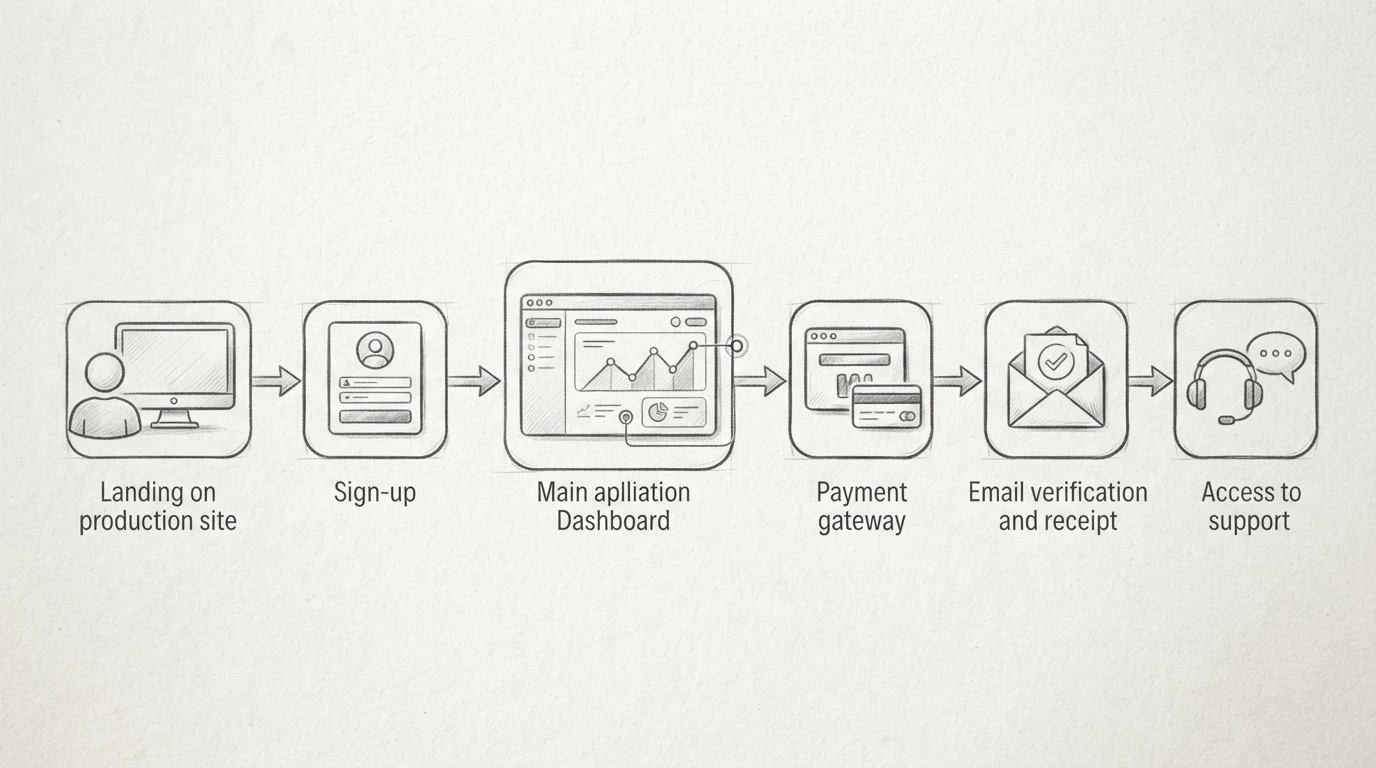
Before you invite anyone in, act like the first customer yourself. Click through every step on the production site, not your laptop. The table later in this checklist flags which checks can wait; this one cannot.
Keep Test and Production Accounts Strictly Isolated
Use separate accounts, API keys and databases for testing and production. Never point test traffic at live customer data. If your SaaS launch toolkit includes staging keys, store them apart from live ones and name them clearly. One mixed-up key can email real users or charge a real card during testing.
Walk Sign-Up, Core Task, Payment, Email and Support in Order
Sign up with a fresh account. Complete the core task your product exists for. Pay for a real plan, then refund yourself if your provider allows it. Check that confirmation and receipt emails arrive and land outside spam. Finally, submit a support request through your own intake form and confirm it reaches you. Fix every broken step before a paying customer finds it first.
The Verification Table: Must-Pass Versus Deferrable
Run every check below as one first-customer journey: sign up, complete the core task, pay, receive email, contact support. The table splits what must pass from what most early teams can defer.
| Check | When it applies | Verification action | Can it be deferred? |
|---|---|---|---|
| Deployment and rollback | Always | Deploy the current build to production, then confirm you can roll back one version | No |
| Isolation of test and production | Always | Confirm production uses separate keys, accounts and data from your test setup | No |
| Production account email | Always | Check the account uses a domain email you control, not a personal address | No |
| Payment and subscription flow | If you charge | Complete a real test-mode checkout, including cancel and refund paths | No |
| Transactional email | Always | Trigger sign-up and password-reset mail to Gmail and one other provider | No |
| Error alerts | Always | Force an error and confirm an alert reaches a channel you check | No |
| Backups and restore | Always | Run a restore from backup into a scratch environment and verify the data | Restore drill can slip days, not weeks |
| Support intake | Always | Submit a message through your own support form and confirm it arrives | No |
| Feedback channel | Recommended | Open a public board or simple form and test it yourself | Yes, a shared inbox works at first |
| Performance and load tests | Recommended | Spot-check response times under modest load | Yes, defer until traffic appears |
Treat security basics and critical alerts as non-negotiable. Everything in the last two rows can wait until after your first paying customer.
For help picking the monitoring and email pieces of your SaaS launch toolkit, browse the verified listings on SaaS Build Directory before your first customer signs in.
Common Mistakes When Skipping the Pre-Launch Pass
Five Failure Patterns to Spot Before Launch Day
Most launch-day fires come from the same five gaps. Shared keys between test and production let a demo wipe real customer data. Untested backups that nobody has ever restored. Silent failures where errors happen but no alert fires. Broken sign-up flows the developer never walked through as a customer. And no support intake, so the first question lands in a void. Run the checklist before each one finds you.

Next Step: Browse Verified Categories in the Directory
Your checklist is done, so your launch stack should now cover email, payments, monitoring and support. If a gap remains, browse the directory categories on SaaS Build Directory to compare verified tools by build stage. Filtering by purpose is faster than another search session. Registration and submissions are closed right now, but browsing is free and always open.
Frequently Asked Questions
Q1: Which workflows must be tested before a SaaS gets its first customer?
Test the full first-customer journey: sign-up or access, core task, payment, confirmation email, and support intake.
Q2: Which startup launch tools can an early-stage SaaS defer?
Defer analytics, A/B testing, and onboarding automation. Never defer security basics, error alerts, or tested backups.
Q3: How do you verify deployment rollback, access permissions, payments, transactional email, error alerts, backup recovery and customer feedback?
Run each in production-like conditions: trigger a rollback, test a refund, send a real email, restore a backup, submit a ticket.
Conclusion
Your first customer only needs a few things to work: a safe deploy you can roll back, a real test of sign-up, payment and email, error alerts that reach you, a backup you have actually restored, and a support inbox you check. Security and alerting checks cannot wait. Most other items can, so verify the must-pass list first, then defer the rest without guilt. When you need tools for any of these checks, browse verified options in our SaaS launch tools directory.